# pino-pretty
[](https://www.npmjs.com/package/pino-pretty)
[](https://github.com/pinojs/pino-pretty/actions?query=workflow%3ACI)
[](https://snyk.io/test/github/pinojs/pino-pretty)
[](https://coveralls.io/github/pinojs/pino-pretty?branch=master)
[](https://standardjs.com/)
This module provides a basic [ndjson](http://ndjson.org/) formatter. If an
incoming line looks like it could be a log line from an ndjson logger, in
particular the [Pino](https://getpino.io/) logging library, then it will apply
extra formatting by considering things like the log level and timestamp.
A standard Pino log line like:
```
{"level":30,"time":1522431328992,"msg":"hello world","pid":42,"hostname":"foo","v":1}
```
Will format to:
```
[1522431328992] INFO (42 on foo): hello world
```
## Example
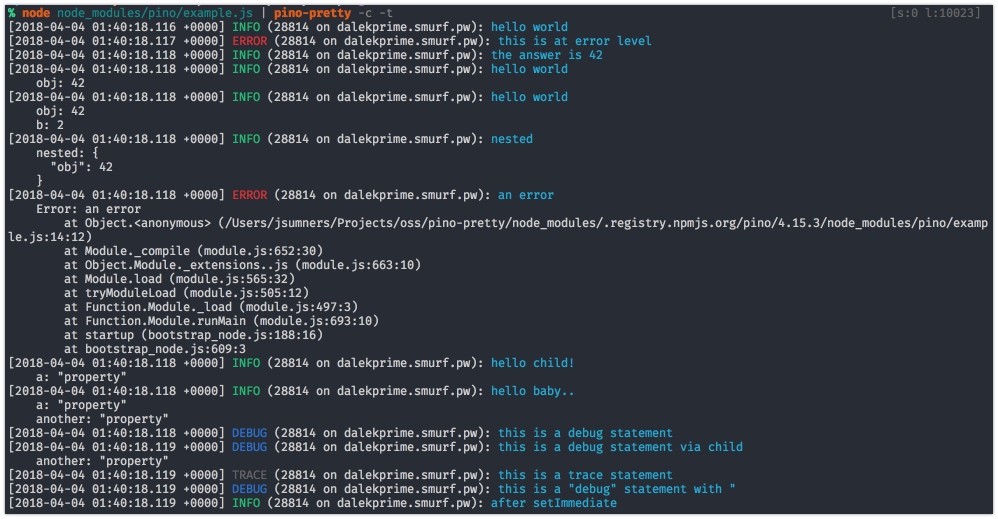
Using the [example script][exscript] from the Pino module, and specifying
that logs should be colored and the time translated, we can see what the
prettified logs will look like:
[exscript]: https://github.com/pinojs/pino/blob/fc4c83b/example.js
## Install
```sh
$ npm install -g pino-pretty
```
## Usage
It's recommended to use `pino-pretty` with `pino`
by piping output to the CLI tool:
```sh
node app.js | pino-pretty
```
### CLI Arguments
- `--colorize` (`-c`): Adds terminal color escape sequences to the output.
- `--crlf` (`-f`): Appends carriage return and line feed, instead of just a line
feed, to the formatted log line.
- `--errorProps` (`-e`): When formatting an error object, display this list
of properties. The list should be a comma separated list of properties Default: `''`.
- `--levelFirst` (`-l`): Display the log level name before the logged date and time.
- `--errorLikeObjectKeys` (`-k`): Define the log keys that are associated with
error like objects. Default: `err,error`.
- `--messageKey` (`-m`): Define the key that contains the main log message.
Default: `msg`.
- `--levelKey` (`--levelKey`): Define the key that contains the level of the log.
Default: `level`.
- `--levelLabel` (`-b`): Output the log level using the specified label.
Default: `levelLabel`.
- `--messageFormat` (`-o`): Format output of message, e.g. `{levelLabel} - {pid} - url:{request.url}` will output message: `INFO - 1123 - url:localhost:3000/test`
Default: `false`
- `--timestampKey` (`-a`): Define the key that contains the log timestamp.
Default: `time`.
- `--translateTime` (`-t`): Translate the epoch time value into a human readable
date and time string. This flag also can set the format string to apply when
translating the date to human readable format. For a list of available pattern
letters see the [`dateformat` documentation](https://www.npmjs.com/package/dateformat).
- The default format is `yyyy-mm-dd HH:MM:ss.l o` in UTC.
- Require a `SYS:` prefix to translate time to the local system's timezone. A
shortcut `SYS:standard` to translate time to `yyyy-mm-dd HH:MM:ss.l o` in
system timezone.
- `--search` (`-s`): Specify a search pattern according to
[jmespath](http://jmespath.org/).
- `--ignore` (`-i`): Ignore one or several keys: (`-i time,hostname`)
- `--hideObject` (`-H`): Hide objects from output (but not error object)
- `--singleLine` (`-S`): Print each log message on a single line (errors will still be multi-line)
- `--config`: Specify a path to a config file containing the pino-pretty options. pino-pretty will attempt to read from a `.pino-prettyrc` in your current directory (`process.cwd`) if not specified
## Programmatic Integration
We recommend against using `pino-pretty` in production, and highly
recommend installing `pino-pretty` as a development dependency.
When installed, `pino-pretty` will be used by `pino` as the default
prettifier.
Install `pino-pretty` alongside `pino` and set the
`prettyPrint` option to `true`:
```js
const pino = require('pino')
const logger = pino({
prettyPrint: true
})
logger.info('hi')
```
The `prettyPrint` option can also be an object containing `pretty-print`
options:
```js
const pino = require('pino')
const logger = pino({
prettyPrint: { colorize: true }
})
logger.info('hi')
```
See the [Options](#options) section for all possible options.
### Options
`pino-pretty` exports a factory function that can be used to format log strings.
This factory function is used internally by Pino, and accepts an options argument
with keys corresponding to the options described in [CLI Arguments](#cliargs):
```js
{
colorize: chalk.supportsColor, // --colorize
crlf: false, // --crlf
errorLikeObjectKeys: ['err', 'error'], // --errorLikeObjectKeys
errorProps: '', // --errorProps
levelFirst: false, // --levelFirst
messageKey: 'msg', // --messageKey
levelKey: 'level', // --levelKey
messageFormat: false // --messageFormat
timestampKey: 'time', // --timestampKey
translateTime: false, // --translateTime
search: 'foo == `bar`', // --search
ignore: 'pid,hostname', // --ignore
hideObject: false, // --hideObject
singleLine: false, // --singleLine
customPrettifiers: {}
}
```
The `colorize` default follows
[`chalk.supportsColor`](https://www.npmjs.com/package/chalk#chalksupportscolor).
`customPrettifiers` option provides the ability to add a custom prettify function
for specific log properties. `customPrettifiers` is an object, where keys are
log properties which will be prettified and value is the prettify function itself.
For example, if a log line contains a `query` property,
you can specify a prettifier for it:
```js
{
customPrettifiers: {
query: prettifyQuery
}
}
//...
const prettifyQuery = value => {
// do some prettify magic
}
```
`messageFormat` option allows you to customize the message output. The format can be defined by a template `string` like this:
```js
{
messageFormat: '{levelLabel} - {pid} - url:{request.url}'
}
```
But this option can also be defined as a `function` with this prototype:
```js
{
messageFormat: (log, messageKey, levelLabel) => {
// do some log message customization
return customized_message;
}
}
```
## License
MIT License